
- >> The ProofTools manual
- >> The ProofTools background and technical addendum page
- >> The feature comparison of free proof tree aka semantic tableau software
ProofTools: a symbolic logic proof tree generator
19 June 2020: ProofTools 0.6.2 fixes a bug and adds support for 64-bit macOS. This means ProofTools now works on Catalina.
ProofTools is a free, cross-platform software application for automatically and graphically generating semantic tableaux, also known as proof trees, semantic trees, analytic tableaux and, less commonly, truth trees, generally used to test whether a formula is a logical truth, or whether a proof/argument is deductively valid. ProofTools is still under development and lacks some features, however it is usable for many purposes. Currently, it can draw proof trees for propositional, predicate (including identity) and (basic/normal, constant domain, contingent-identity) modal logic, and it is available for Windows (both 32 and 64 bit), Macintosh OS X and Linux (both 32 and 64 bit).
ProofTools is documented in the ProofTools manual and in the ProofTools background and technical addendum page. A feature comparison of free proof tree aka semantic tableau software is also available so you can see what other free semantic tableaux software tools are around and whether any of them better suit your needs.
ProofTools is developed with Lazarus, a free, cross-platform, Delphi-like Object Pascal integrated development environment (IDE). The ProofTools source code is not currently publicly available but that might change for future versions.
ProofTools may be downloaded freely and used without limitation. It may also be shared and distributed freely unless money is charged for that distribution, in which case permission is required (this restriction was introduced in version 0.4 beta). Please link to this site for downloads rather than duplicating and hosting the downloadable files elsewhere - this makes it easier for us to keep track of how many people are downloading the program.
Please report any bugs that you find (after first checking that they haven't already been identified), including how to replicate them if known. Also please feel free to contact me about this software project or for any other good reason.
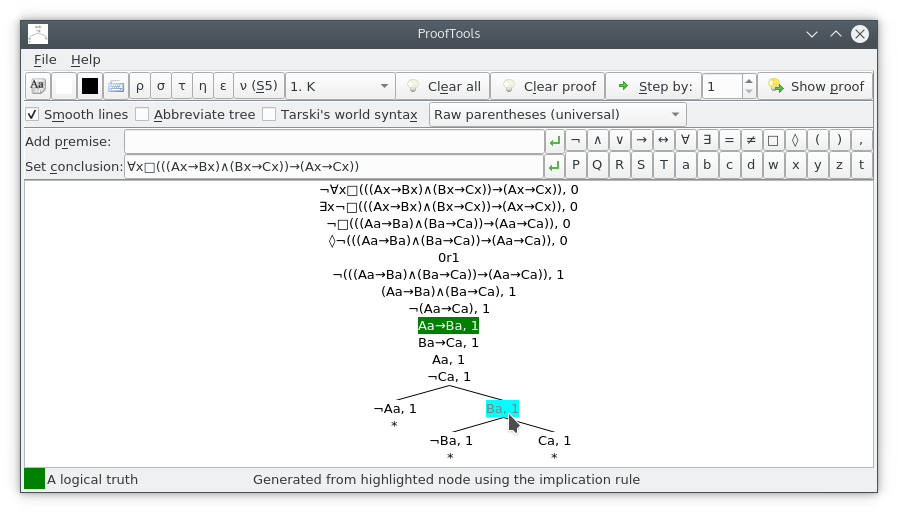
Screenshot
Download
Version 0.6.2, released 19 June 2020
linux x86 32-bit, GTK2 linux x86 32-bit, Qt linux x86 64-bit, GTK2 linux x86 64-bit, Qt5 win32 win64 macos 64-bit
New features:
- Bugfix: for some proofs, notably the simplest of premise P and conclusion P, the application aborted due to trying to free already-freed memory.
Version 0.6.1, released 13 June 2019
linux x86 32-bit, GTK2 linux x86 32-bit, Qt linux x86 64-bit, GTK2 linux x86 64-bit, Qt5 win32 win64 mac osx x86
New features:
- Bugfix: the (negated) biimplication rule had been copying branch data erroneously with the effect that nodes from one of the generated branches could be mistakenly used in rule applications on the other branch. This was exemplified by the invalid argument being assessed as valid: premise #1 Td↔(Oj∧Cj), premise #2 Te↔∀x(Ox→Cx), conclusion Td→Te. (This bug had been introduced in version 0.6).
Version 0.6, released 16 Feb 2019
linux x86 32-bit, GTK2 linux x86 32-bit, Qt linux x86 64-bit, GTK2 linux x86 64-bit, Qt5 win32 win64 mac osx x86
New features:
- Bugfix: disabled infinite branch detection, known to be using a defective algorithm which gives the wrong results in some cases, except for the straightforward detection of infinite branches due to applications of the modal extensibility rule, which was left in place.
- Added a progress window for when clicking "Show Proof". This includes a "Cancel" button which provides users with a means to escape infinite branches (trees) given that automated detection has been disabled.
- Added a numeric input box to allow specification of the number of rules to apply at a time when clicking the "Step" button, defaulting to one. (The progress window is not shown when stepping like this).
- Bugfix: fixed the "branching modal logic with necessity" bug, exemplified by ProofTools reporting to be NOT valid when it IS valid the argument with premise □(P∧Q) and conclusion □P∧□Q.
- Corrected a mistaken hint on the "T" tool button.
Version 0.5 beta, released 9 Oct 2014
linux x86 32-bit, GTK2 linux x86 32-bit, Qt linux x86 64-bit, GTK2 linux x86 64-bit, Qt win32 win64 mac osx x86
New features:
- Bugfix: sometimes, when starting the app, its main window's status bar was invisible until that window was resized.
- Added copy-to-clipboard support for both individual nodes (plain text) and the entire tree (as an image), accessible via a right-click context menu.
- Added counter-model popups, fully supporting propositional, predicate and modal logic in any combination, with a copy-to-clipboard feature accessible via a right-click context menu.
- Added support and a toggle box for the modal Euclidean accessibility relation ε, equivalent to toggling modal axiom 5.
- Added a new dropdown box for all basic/normal modal logic variants - selecting an item in the dropdown sets the appropriate toggles of reflexivity, symmetry, transitivity, extendability, Euclidean and S5. Items in the dropdown are prefixed by a number - equivalent modal logic variants share the same number. For completeness, all included modal logic variants parenthesised into their fifteen equivalent groups are: (K), (KB), (KD), (KT, KDT, T), (K4), (K5), (KBD), (KBT, KBDT), (KB4, KB5, KB45), (KD4), (KD5), (KT4, KDT4, S4), (KT5, KBD5, KBD4, KBT4, KBT5, KDT5, KT45, KBD45, KBT45, KDT45, KBDT4, KBDT5, KBDT45, S5), (K45) and (KD45).
- Decoupled the S5 toggle box from the other modal accessibility relation toggle boxes (toggling it on now untoggles the rest), because in actuality the S5 proof tree rules are distinct from the other modal accessibility relation proof tree rules.
- Added several new tests based around the normal modal axioms.
- Bugfix: sometimes, adding a premise to, or changing the conclusion of, an existing argument, or clearing and then rerunning a proof, gave the wrong result (different to the original run, if any), due to state data not being correctly cleared. e.g. toggling S5 on and then setting a premise of
□P, and a conclusion of□□P∨∀xQx→Px∧x=a, then clicking "Show proof", (correctly) showed a "Valid argument" result, but then clicking "Clear proof" followed by "Show proof" (incorrectly) showed an "Invalid argument" result. - Corrected the hints for constant/variable shortcut buttons.
- Bugfix: sometimes, randomly, the second branch of a disjunct which should have had a modal extensibility rule applied to it and then been labelled infinite was instead left open.
Version 0.4.2 beta, released 29 Apr 2014
linux x86 32-bit, GTK2 linux x86 32-bit, Qt linux x86 64-bit, GTK2 linux x86 64-bit, Qt[3] win32 win64 mac osx x86
New features:
- Turned the "abbreviated tree" feature into an option (accessible via a checkbox), defaulting to off rather than mandatorily on as it had been.
- Implemented greater sophistication of handling of parentheses, including:
- Provided an interface option (a dropdown box) to (de)normalise parentheses, either universally across the tree, or from the current point onwards.
- Implemented the parsing, storing and reproducing of all parentheses including those subsequent to unary operators, to any level of nesting.
- Bugfix: individual constants/variables were being incorrectly parenthesised in identities under Tarski syntax.
- Bugfix: when applying a negated universal/existential quantifier rule, or a negated necessity/possibility rule, and the negation operator is switched inside to apply to a term involving a binary operator which wasn't yet parenthesised, parentheses weren't being generated to make it clear that the negation operator applied to the entire binary term rather than to just the first one.
- Split the settings toolbars into four, so that the minimum width of the app can be reduced to approximately 640 pixels - to support resolutions of 640x480.
- Added symbols for several common proposition/predicate/variable/constant names, so that the mouse can be used entirely for entry without needing to intersperse mouse clicks with keyboard entry.
- Added three new symbol replacements, /\ (forward slash, backslash) for conjunction, -| for negation, and -] for the existential quantifier.
- Bugfix: when "abbreviated tree" was enabled (which until now it had been mandatorily), sometimes duplicate identity nodes were not being detected.
- Bugfix: under the GTK2 widgetset, when the active premise/conclusion entry box cursor was at a location prior to the end of the text in the box, clicking a symbol button would insert the symbol in the wrong place (at the beginning or end of the text).
- Propagated font changes to secondary windows (the hotkey editor and test results windows).
Version 0.4.1 beta, released 22 Jun 2013
For your peace of mind: Softpedia have certified the Windows and Mac builds of this release to be free from spyware, adware and viruses. All builds of all versions are, of course, equally clean.
linux x86 32-bit, GTK2 linux x86 32-bit, Qt linux x86 64-bit, GTK2 linux x86 64-bit, Qt win32 win64 mac osx x86
New features:
- Bugfix: the Substitutivity of Identicals rule was not being applied to identities themselves, such that the logical truth (a=b∧c=b)→a=c was not being evaluated as a logical truth.
- Bugfix: world numbers were sometimes displaying when they shouldn't have.
- Bugfix: the form was oversize on initial opening on OS X.
- Changed a symbol replacement: \/ (backslash, forward slash) is now replaced with the disjunction operator, ∨, rather than the universal quantifier, ∀.
Version 0.4 beta, released 3 Jun 2013
linux x86 32-bit, GTK2 linux x86 32-bit, Qt linux x86 64-bit, GTK2 linux x86 64-bit, Qt win32 win64 mac osx x86
New features:
- Support for normal modal logics, including both basic, K, and those characterised by one or more of reflexivity, symmetry, transitivity and extendability, which includes support for S5. This implementation of modal logic has constant domain when quantified, and contingent identity.
- Support for identity (a=b) and negated identity (a≠b).
- Support for numbered predicate, proposition, variable and constant names.
- Support for symbol replacements whilst editing formulas (e.g. <-> is replaced with ↔).
- Support for Tarski's world syntax via a checkbox (by request).
- Optimised rule generation/application such that potential applications of rules that would add only nodes that already exist on the branch are ignored.
- Optimised rule choice so that rules that would close the branch are chosen ahead of all others.
- A battery of tests accessible from the File menu.
- Bugfix: the width of the tree panel was sometimes greater than it needed to be for some trees when scrollbars were visible.
- OS X bugfix: the status icon wasn't changing colour.
- Parser error-detection bugfix: the parser failed to pick up a certain type of error in certain cases, that error being when a predicate was specified multiple times with a different number of variables (the actual conditions for the error were more specific than this). An example of a formula containing this type of error (w.r.t. the P predicate) that would fail to be detected by the parser is ∃x∃yPxy∧Qxy∧∃zPxyz∧Qxy.
Version 0.3.2 beta, released 14 Dec 2012
New features:
- First Mac release! Contains compatibility fixes for Mac OSX, x86 (Intel) platform only - otherwise is identical with the previous 0.3.1 beta release, hence no new files have been released for existing platforms.
- Note: this first release is not perfect - in particular, the validation status icon (the square at the left of the status bar bottom of application) never changes colour - you will need to rely on the messages in the status bar.
Version 0.3.1 beta, released 16 Nov 2012
linux x86 32-bit, GTK2 linux x86 32-bit, Qt [2] linux x86 64-bit, GTK2 linux x86 64-bit, Qt [2] win32 win64
New features:
- Bugfix: fixed a bug that could cause invalid arguments to be assessed as valid: the same constant was sometimes used for multiple separate applications of the universal quantifier rule.
- Bug/build fix: fixed a bug of unknown origin in the prior release whereby clicking on symbol buttons in the Linux builds resulted in symbols being inserted at the beginning of the active text box rather than at the cursor.
Version 0.3 beta, released 12 May 2012
linux x86 32-bit, GTK2 linux x86 32-bit, Qt[2] linux x86 64-bit, GTK2 linux x86 64-bit, Qt[1] win32 win64
New features:
- Bugfix (a parsing bug): fixed a bug that was exemplified by ∀xCa∧Dx→Fax being incorrectly parsed as ((∀x)Ca∧Dx)→Fax instead of (∀x)(Ca∧Dx→Fax). This was due to unary operators (including quantifiers) being bound to the first binary operator that follows, rather than to the lowest precedence binary operator that follows within the scope of the unary operator.
- Overhauled the drawing code majorly for speed and efficiency, replacing TLabel components with direct drawing to the canvas.
- Bugfix: fixed a bug that had been causing two problems: trees being bigger than they needed to be, and the wrong secondary node (the one from which the constant was taken) being highlighted when mousing over a node generated by a universal quantifier rule application.
- Bugfix: (mostly) solved a problem where scrollbars would appear or disappear when they ought not to during resizing of the main window.
Version 0.2.2 beta, released 19 October 2011
linux x86 32-bit, GTK2 linux x86 64-bit, GTK2 win32 win64
New features:
- Bugfix: only the first of multiple identical variables in a predicate was being replaced with a constant in a universal quantifier rule application.
- Bugfix: certain expressions, such as (∀x)(Fx)∨¬(∃x)(¬(Fx)), were being incorrectly parsed.
- A re-fix of the parse error message "fixed" in 0.2.1 beta.
- Bugfix: after hovering the mouse pointer over a node and then changing the tree's background colour using the background colour dialogue button, the node's background colour was not updating from its old colour until the mouse pointer was again hovered over it.
Version 0.2.1 beta, released 30 October 2010
linux x86 32-bit, GTK2 linux x86 64-bit, GTK2 win32 win64
New features:
- Bugfix: unclosed branches were randomly falsely being labelled infinite.
- Minor correction: fixed a faulty parse error message.
- The validation status messages for when only a conclusion is set have been adjusted to indicate that rather than being an (in)valid argument it is or is not a logical truth.
Version 0.2 beta, released 25 October 2010
linux x86 32-bit, GTK2 win32 win64
New features:
- Support for predicate logic including detection of infinite loops on a branch. There is no support yet for nested functions although this is planned for down the road.
- Holding the mouse pointer over a node now highlights the node/s it was generated from, and displays in the status bar the rule that was used to generate it.
- Operator precedence and tolerance of missing pairs of parentheses.
- Customisable hotkeys.
- The ability to draw a tree based on premises only and without setting a conclusion.
- Enhancements to the status bar including separation of messages from the status of the validation, and colourisation of the status of the validation.
Version 0.1 beta, released 27 September 2010
linux x86 32-bit, GTK2 win32 win64
- Initial public release. Contains support for validation of propositional logic proofs using the method of proof tree, also known as semantic tree, analytic tableau and semantic tableau.
Footnotes
- [1] Oops, this was a copy of the 64-bit Linux GTK2 file; I've deleted it and won't bother to repackage the correct file given that a new version of ProofTools has since been released
- [2] (Update: as of version 0.4 beta, this footnote no longer applies: the required Qt4Pas library files are included with the program, and moving them to /usr/local/lib is optional). Whilst the Qt versions of ProofTools require the Qt library, and you can almost certainly install this library automatically through your package manager, they also require the Qt4Pas shared library to be present at /usr/local/lib, and you will almost certainly need to install this library manually. You can download it from this page, clicking on the "X11 i386 Libray Binary" link if you are downloading the 32-bit version of ProofTools, and clicking on the "X11 x86-64 Libray Binary" link if you are downloading the 64-bit version of ProofTools. Unpack to /usr/local/lib (you will probably need superuser privileges to write to this location) the .so files in the archive that you download. What benefit do you get from this? The Qt version of ProofTools will handle the drawing of larger trees that will cause the GTK2 version to error out.
- [3] Something seems to have gone wrong with the build process, and the binary I originally provided here was in fact a GTK2 build rather than a Qt build. I have deleted the file to avoid any further confusion.
Known bugs
The following bugs are known to exist in the current version. Bugs in previous versions can be identified by reading through the feature listings of later versions and noting "bugfix" entries.
-
Parentheses normalisation sometimes adds extraneous pairs of parentheses. For example, the formula
◊∀xPx∨Qx∧¬a=bwhen parentheses are normalised appears as(◊(∀x)((Px∨Qx)))∧(¬(a=b))i.e. there is an extraneous pair of outer parentheses, and an extraneous pair of parentheses aroundPx∨Qx. I am yet to look into this bug and come up with a fix - it's kind of a fiddly area of the code.
Known limitations
- Naive generation of predicate trees: ProofTools does not use any sophisticated methods of generating predicate tableau, such as unification. It simply applies rules straightforwardly. This often leads to trees which are much larger than they could otherwise be.
- Awkward counter-model popup behaviour: The counter-model popups are coded as "normal" windows (albeit lacking borders), which on some platforms means that they must be switched through separately when using task-switching (e.g. using Alt+Tab). If anyone can suggest to me a better cross-platform way to code popup windows with Lazarus, I'd be very grateful.
- Slow drawing for large trees: The code for drawing trees slows dramatically as the number of nodes increases, so that trees of several thousand nodes or more take very unreasonable periods of time (in the realm of hours) to be drawn. Unfortunately, whilst modest improvements are possible for only a little effort, the primary culprit is the fundamental design of the positioning code, and the fix will take some effort - I have no ETA for it.
- Very large trees aren't supported: Depending on your platform, ProofTools will either crash, or fail to correctly display, very large trees. How large is "very" large? I don't have exact figures, and it depends on your platform, but roughly in the realm of tens of screen widths wide or high.
Explanation: ProofTools draws the entire tree to an image component (TImage), which it then allows the user to scroll within the viewport. There appear to be certain undocumented constraints, depending on the runtime platform, on the size to which a TImage can grow, outside of which either an exception is raised (which ProofTools currently does not handle, leading to a crash), or methods to draw to its canvas do not do what they are supposed to do. It would be possible to remove this constraint, and to allow for unlimited (other than the constraint of available memory) size trees by eliminating the full-tree image drawing, and instead drawing on demand only the region of the tree within the viewport. This, however, would require fairly extensive changes to the code, and there is at this point no expected timeframe within which those changes will be made. - Inadequate fonts on Windows XP and earlier: By default, none of the fonts provided on Windows XP (and presumably all earlier versions of Windows) support all of the logic characters used by this program, and those unsupported logic characters show up as rectangles. This can be remedied by installing a font that supports these characters, and by then selecting that font in the program. One set of free fonts that supports these characters is the DejaVu fonts, which can be downloaded from that link, and, after unzipping them, installed using these instructions. Once installed, you can then set one of them to be the program's font by clicking on the font button in the top left of the screen, or by pressing ctrl+F. You will need to separately set the font for both the interface and for the tree. Currently, settings are not saved, so you will need to do this each time you run the program.
Collaboration
Emil Kirkegaard instigated this project and collaborated with me very closely on it for some time. ProofTools is indebted to him for his passion for logic. He is primarily responsible for the design of the application, and for clearly explaining to the programmer (me) through word-processing documents those proof tree rules which were implemented prior to my purchase of the text on which we based ProofTools. These days, he prioritises other activities higher - mostly, publishing papers at the open-access journals that he founded. He can still be tempted, though, into offering advice, suggestions and feedback on ProofTools.
